Trade Focus · Dental practices

Websites and online booking for dental practices.

Most dental sites end at a phone number and an opening-hours box. The patient calls between appointments, describes the problem to whoever picks up, and the front desk writes it down. A booking form that writes into the practice system removes that step.

Free written scope and fixed price within 3 business days. Most builds take 4–6 weeks. No obligation.

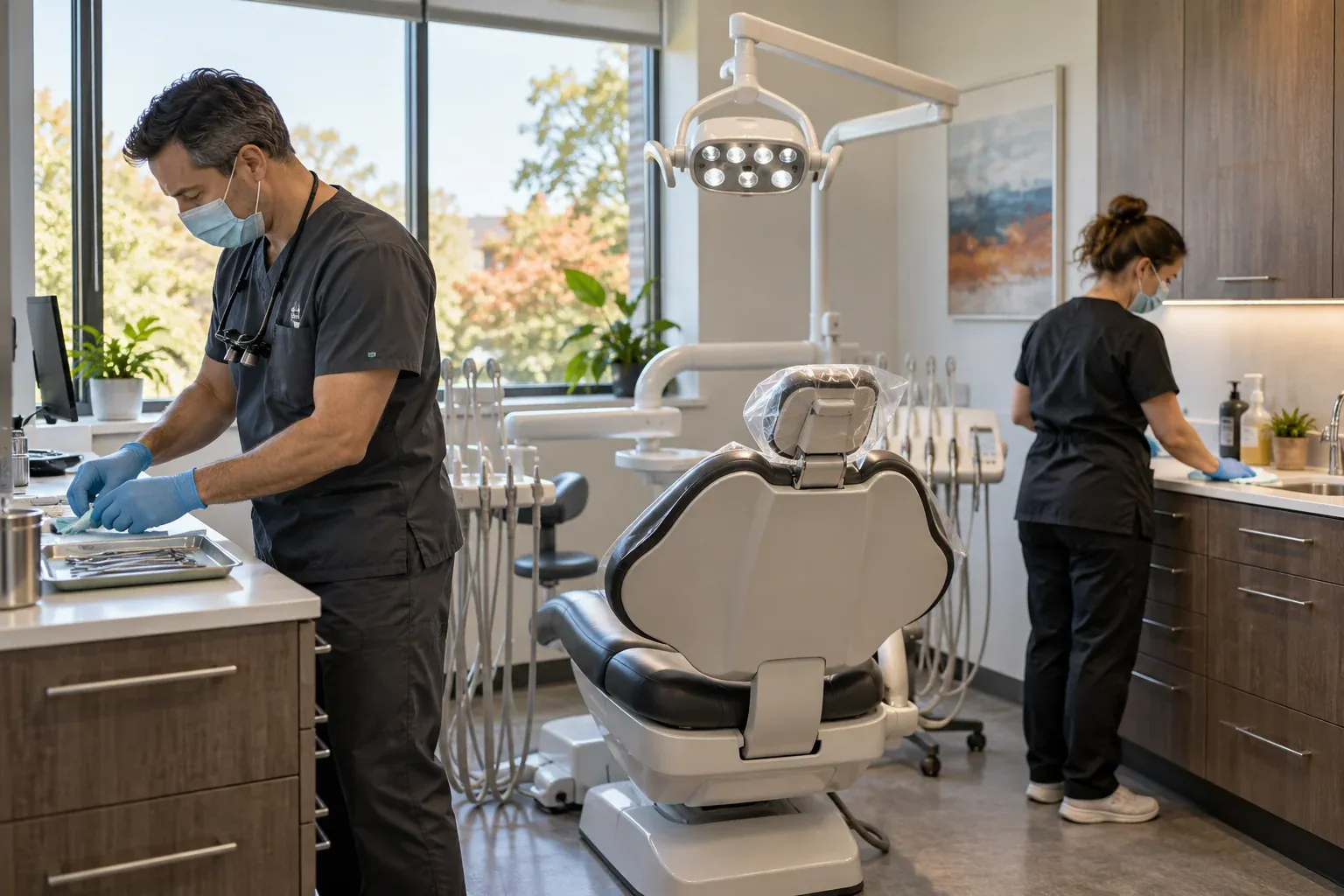
A dentist and dental assistant preparing a modern operatory with the chair and examination light visible

Concrete Scope

What a dental practice site has to get right

Here is what the work covers in practice, agreed upon in writing before we begin.

Booking request checklist6 requirements
  • A form that asks the right questionNew patient or returning, urgent or routine, recorded before the appointment is confirmed.
  • Times that come from the diaryAvailable slots offered from the practice system, not a fixed list that goes stale.
  • No account, no paymentFour short steps and a summary to check. The practice confirms afterwards.
  • A request, not an emailReason, slot and phone number written into one place the front desk already uses.
  • Treatment and fees in plain languageWhat a consultation includes, what it costs, and what is covered, before the patient arrives.
  • Readable one-handedThe booking flow works on a phone, in the languages the practice actually answers in.
Patient requestPractice diaryFront desk review

Practical Guide

From the patient's screen to the practice diary

Seven handoffs between a demonstration booking site and a real practice system running on synthetic demonstration data.

One request, seven handoffs

From the patient's screen to the practice diary.

The patient-facing and practice-side screens come from separate synthetic demonstration environments. The rail explains the connected workflow; the screenshots are not one submitted transaction.

  1. RequestDental Office DemoThe patient picks a reason for the visit and a time on the practice site.
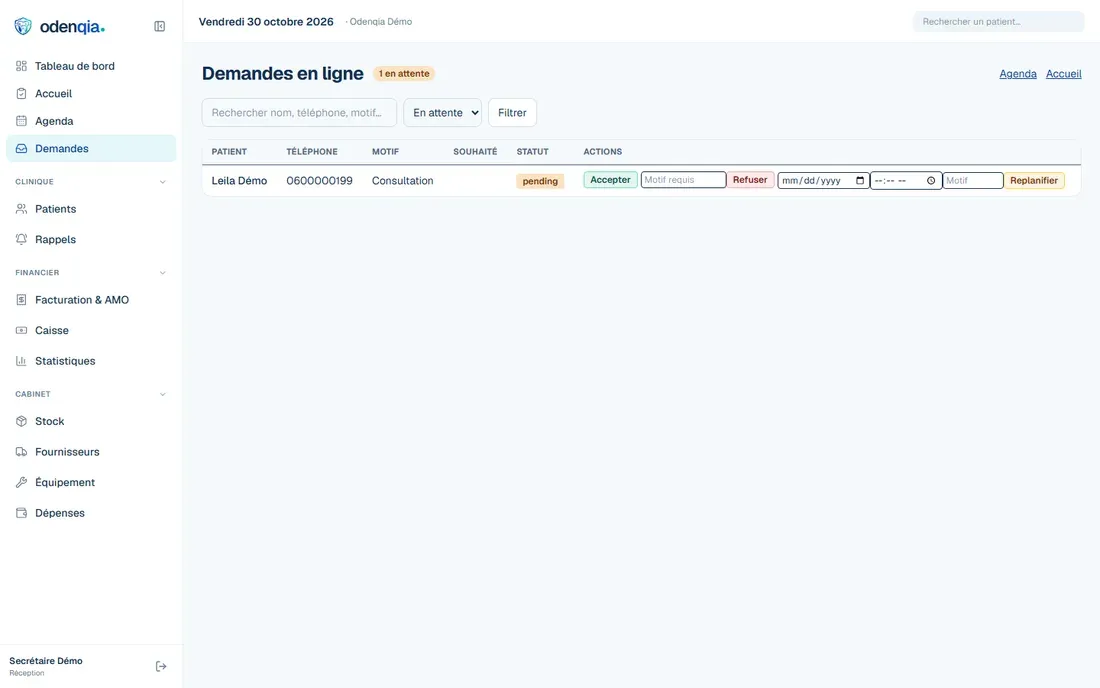
  2. InboxOdenqiaOn the practice side, online requests appear in Odenqia for reception review instead of being retyped from email.
  3. Reception reviewOdenqiaThe front desk reads the reason and the slot the patient chose.
  4. AgendaOdenqiaThe appointment sits in the practice diary alongside the day's other patients.
  5. Check-inOdenqiaThe patient arrives and the diary marks them present.
  6. Patient & financial recordOdenqiaThe visit, the treatment and the invoice are recorded against the patient.
  7. Next appointment or recallOdenqiaThe follow-up is scheduled, or the patient is added to the recall list.

Separate demonstration captures — not one submitted patient record.The patient step was filled with a synthetic identity and never sent; the practice-side screen is Odenqia's own demonstration clinic, entered through its public one-click demo.

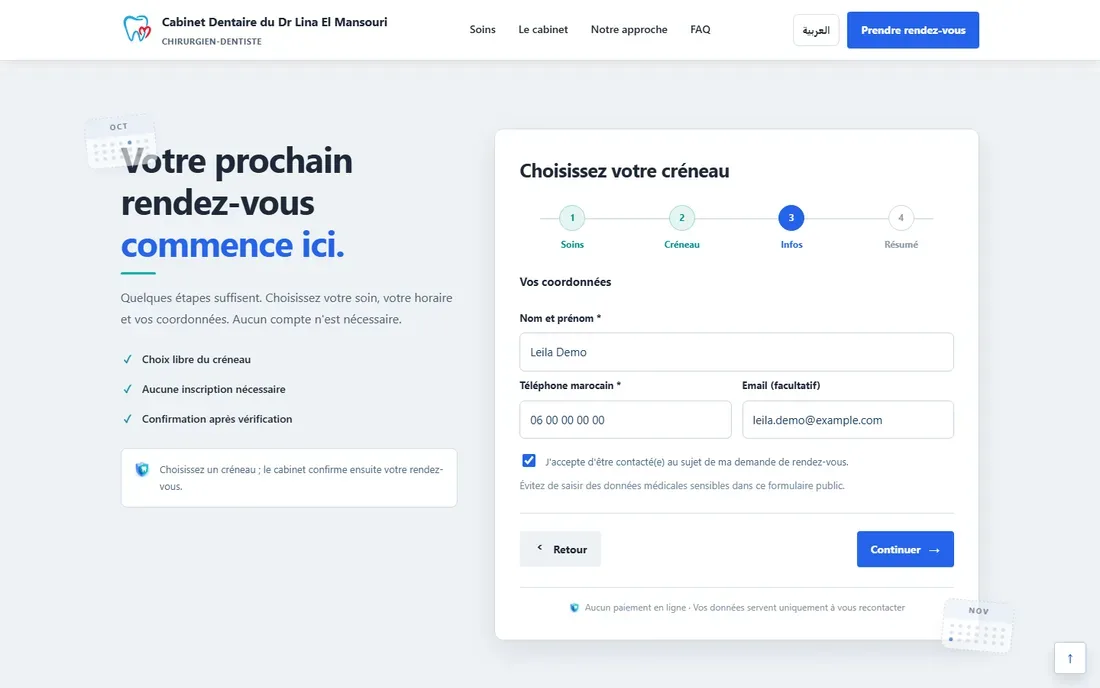
Step three of the Dental Office Demo booking wizard, asking for the patient's name, Moroccan phone number, optional email address and consent to be contacted
Demonstration — Dental Office Demo. Fictional example built for demonstration — not a real client site.The patient's own step: name, phone, an optional email and a consent box. No medical details are asked for.
The Odenqia online requests screen in the demonstration clinic, listing booking requests received from the website
Demonstration — Odenqia, demonstration clinic. Fictional example built for demonstration — not a real client site.The corresponding practice-side request queue in Odenqia's demonstration clinic.

What this demonstration does not claim

  • Automatic confirmationThe practice confirms. The demo's own FAQ says the cabinet chooses between immediate and manual confirmation, and that no real reservation is made on the demo.
  • PaymentThe demo states there is no online payment. Nothing here shows a card, a checkout or a successful charge.
  • Messaging deliveryNo SMS or WhatsApp message is shown or claimed. The demo says the cabinet confirms by telephone.
  • Treatment decisionsThe demo states the dentist determines the appropriate treatment after examination. No diagnosis is automated.
  • Automatic follow-upRecall exists as a list the practice works through. Nothing here claims it sends anything by itself.

Each point is stated because the demonstration could be read as promising it. The demo site itself carries the same limits in its own FAQ.

How the work is evaluated. Description of how the work is evaluated — not an outcome claim.

The booking request is the product

A dental practice is rarely short of information online. It is short of a way to book that does not cost the front desk a phone call. The form is what earns its keep: the reason for the visit, the time the patient chose, and a number to reach them, written down in one place before anyone picks up.

That means the form has to ask for the right things. A new patient with tooth pain and an existing patient due for a cleaning are different requests, and the practice needs to see which is which before the appointment is confirmed.

Booking request
  1. Reason for visit
  2. Available time
  3. Contact details
  4. Request sent

What the patient sees

No account, no password, no card. Four short steps: the reason for the visit, an available time, contact details, then a summary to check before sending. The practice confirms afterwards, so the site never promises a slot the diary cannot keep.

Offered times come from the practice diary rather than a fixed list, so a slot that is already taken is not offered in the first place.

What the patient sees

✓No account

✓No payment

✓Summary before sending

Practice confirms

Where the website and the practice system meet

The part that is usually missing is the join. A form that sends an email leaves the front desk retyping the same details into the practice software, and the time the patient chose is only a suggestion.

The dental build I made connects the site booking form to a practice system with an agenda, patient records and invoicing, so the request arrives as a request, with the reason and the slot attached. The demonstration below shows that flow working end to end.

Website to practice system

Booking form

Reason + time

Odenqia

✓Front desk review

Request recorded

Demonstration

See the booking flow in action

A working demonstration, not client work: the practice, the dentist and the address on it are fictional. It shows the template and the booking flow connected to the practice system.

Dental practice management · MoroccoApplication demonstration · synthetic data

Odenqia

A dental practice system where an online booking request arrives as a request, not as an email to retype.

What the build does

  • An online-requests queue that separates a booking request from a phone message
  • A diary that holds the appointments and marks a patient present on arrival
  • Patient records and treatment plans alongside the agenda
  • Quotes, invoices and AMO cover calculation for Moroccan practices
  • A recall list for patients due back
odenqia.taptheweb.us
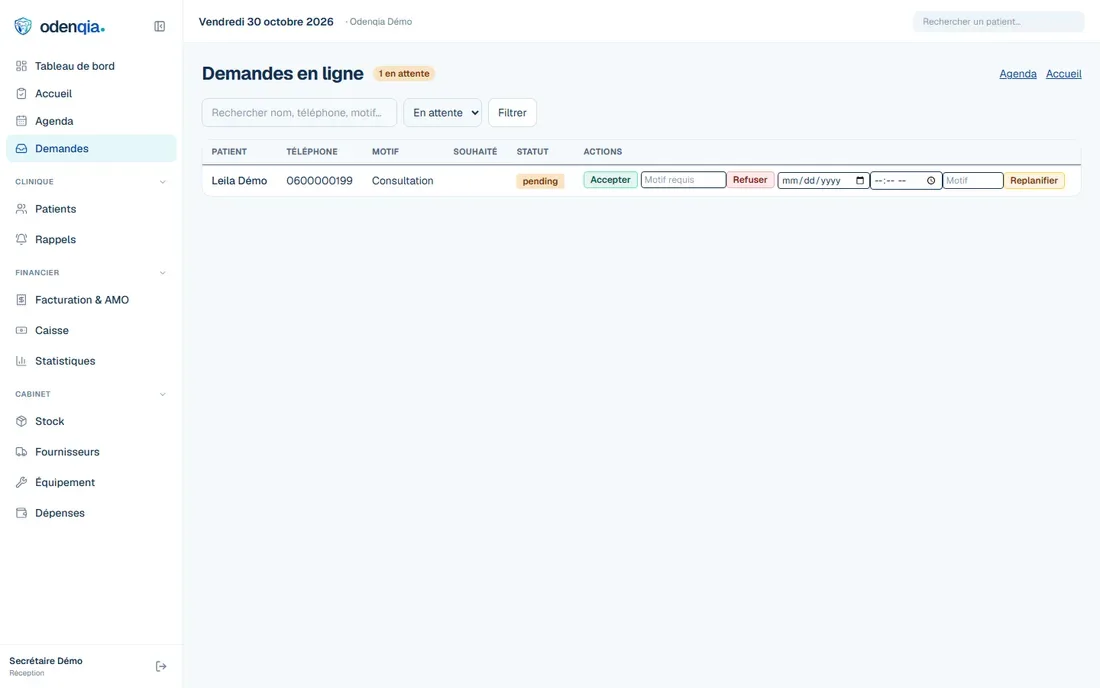
Captured through Odenqia's public one-click demo, on synthetic demonstration data: the Odenqia website
Captured through Odenqia's public one-click demo, on synthetic demonstration data

Transparent Process

How projects run from start to finish

You work directly with me from the first focused review to final launch. The findings, priorities, deliverables, and costs are explained before any paid work starts.

  1. Step 1 of 4

    Share your business information

    Provide your business, website, and contact information.

  2. Step 2 of 4

    Choose a review

    Select design, technical performance, search visibility, or digital presence.

  3. Step 3 of 4

    Receive written findings

    I review the selected area and send the important findings and priorities by email.

  4. Step 4 of 4

    Choose the next step

    You may make the changes independently or ask TapTheWeb for a written proposal.

Need a new website instead? You get a free written scope and fixed price within 3 business days. Most builds take 4–6 weeks. Start my website

Your business keeps control.

The website, domain, content, and Google accounts belong to you. The written scope explains the setup, handoff, and any optional ongoing service arrangements with zero proprietary lock-in.

Explore the full process

Questions Worth Answering

Frequently asked questions

Common considerations for business owners planning website and search improvements.

Is the dental site in your portfolio a real client?

No, and the page says so. It is a demonstration built to show the template and the booking flow. The practice, the dentist and the address on it are fictional, and the site itself carries a notice saying the information is not real.

Can booking connect to the software my practice already uses?

It depends on whether that software accepts a booking from outside. If it has an API or an import, a form can write into it. If it does not, the honest options are a request that arrives by email or a separate system, and I will say which one you are getting before anything is built.

Do patients need an account to book?

They should not. Every step between a patient and a sent request loses some of them. Four short steps, no password and no card, with the practice confirming afterwards.

Next step

See whether dental practices should be your next priority.

Tell me what is limiting your website. You receive a clear, written review with practical priorities — no call required to start.

Free written scope and fixed price within 3 business days. Most builds take 4–6 weeks. No obligation.